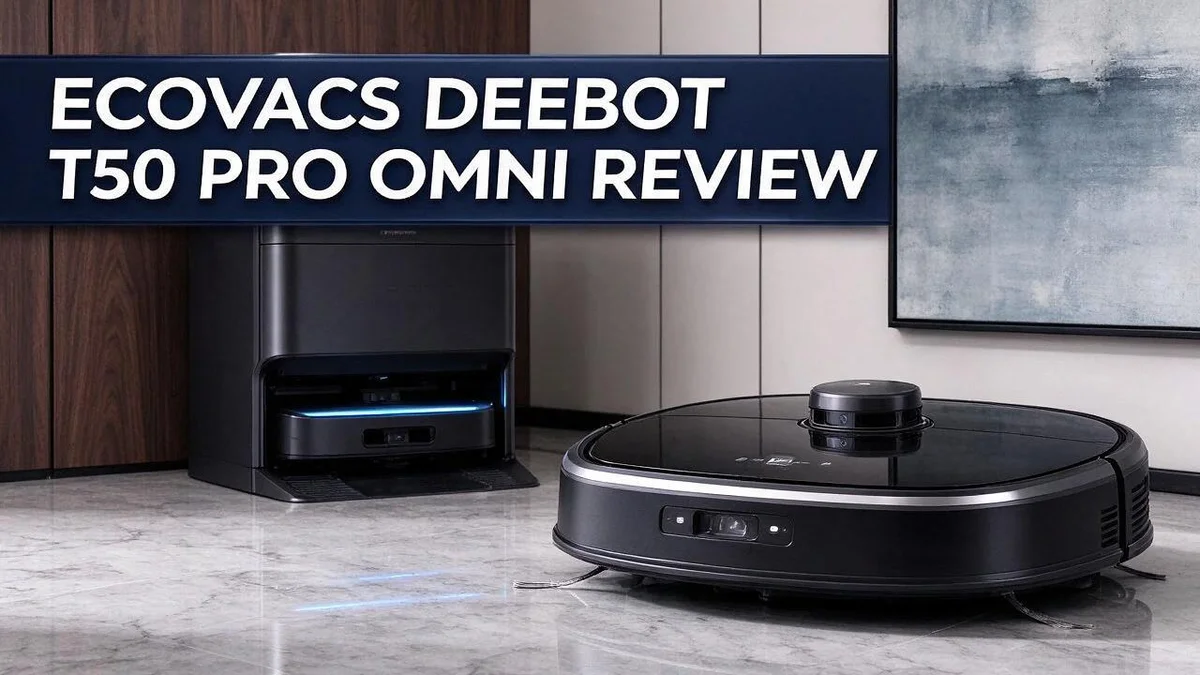
Ecovacs Deebot T50 Pro Omni Review: Is It Worth The Price?
Are you tired of vacuuming and mopping on the same day? The Ecovacs Deebot T50 Pro Omni aims to handle both jobs for you.
This robot brings 15,000Pa of suction and LiDAR navigation at the front. It also includes a station that empties the dust bin on its own, so you spend less time on chores.
Many testers praise its mopping performance, and one reviewer rated it best in class. Users also mention quieter runs and improved battery life.
Still, the AI support gets mixed feedback. Some Reddit users share negative views on the T50 line, so it pays to read both sides.
Model names vary across sources, and specs may differ between versions. This guide breaks down the key features, strengths, and weak spots, so you can decide if this robot fits your home.
In a Nutshell
- Hands free cleaning suits busy homes. The robot empties its own bin into a station, so you rarely touch the dirt.
- Smart obstacle handling keeps the robot moving. It avoids objects and cleans close to walls and edges.
- ZeroTangle 2.0 technology helps stop hair and cords from wrapping around the brushes. Pet owners may find this feature useful.
- Slim design helps it reach under furniture. The listing shows a height of 8.1cm.
- Improved battery life means fewer recharge breaks during a full clean.
- Mixed community feedback appears on Reddit. Some users feel the T50 line let them down, so read recent reviews before you decide.
Suction and Cleaning Power

Last update on 2026-11-24 / Affiliate links / Images from Amazon Product Advertising API
Suction power matters most on carpets, rugs, and pet hair. The Deebot T50 Pro Omni steps up from earlier models. Its predecessor, the T30 Pro Omni, offered 12,000Pa, so this is a clear jump.
A stronger motor pulls dirt from deep within carpet fibers. Owners with shedding pets often notice the difference fast. Crumbs and fine dust get lifted before they spread across the room.
Edge cleaning works hand in hand with suction. TruEdge 2.0 helps the robot reach along walls and baseboards. Corners often collect the most dirt, so this feature matters a lot.
Good suction alone does not finish the job on hard floors. The robot also uses OZMO Turbo 2.0 mopping. Wet pads scrub spills and sticky marks that vacuuming leaves behind.
Mop pads can get dirty fast during a long clean. Hot water washing helps keep them fresh between runs. The station also dries the pads, which helps prevent musty smells.
Heavy debris, such as cereal bits or pet litter fragments, can be picked up in one pass. This saves time and reduces the need for extra passes over the same spot.
Some sources describe the mopping as best in class. One tester rated the T50 Max Pro and T50 Pro this way. Strong results still depend on floor type and how often you clean.
Thick rugs and hard floors may suit different settings, so check the app before starting. A quick adjustment can improve results on each surface.
Model names can change how these results apply. Sources mix the T50 Pro Omni and T50 Max Pro Omni names. Specs may differ between versions, so confirm the exact model before you decide.
Mopping and Water Handling
The OZMO Turbo 2.0 mopping system handles the wet work on your floors. Each mop pad spins against the surface to scrub away sticky spots.
Hot water is another standout feature. One listing says the station can wash the mop pads with hot water. Warm water can help lift greasy messes from the pads.
After washing, the station can also dry the pads. This step matters because damp pads can develop odors over time. Dry pads help the robot stay fresh between runs.
The auto empty station supports the whole process. It takes care of debris collection, so you spend less time on upkeep.
Clean water makes a difference too. Refill the clean water tank before each mopping job. A full tank keeps the pads wet for the whole route.
Check both water tanks after every job. Empty the dirty water and rinse the tank well. This habit helps prevent odors and keeps the system working properly.
Dirty pads can leave streaks on tile and wood. Washing them between passes helps you avoid that problem.
Keep an eye on the station indicators. They show when water or pads need attention.
The station works best with regular care. Rinse the pads and let them dry fully before the next cycle. This simple habit protects the mop pads and helps them last longer.
Confirm the hot water and drying features on the exact model you plan to use. Specs can differ between versions, so this quick check prevents surprises.
Navigation and Obstacle Avoidance
The navigation system starts with a front mounted LiDAR sensor. It sends out laser pulses and measures how long they take to bounce back. This helps the robot build a clear map of each room.
Map accuracy matters a lot. A good map lets the robot plan straight lines instead of random bounces. It also helps the machine know which rooms need cleaning and which ones to skip.
The AIVI 3D 3.0 system adds another layer of vision. It aims to help the robot tell apart common items like socks, shoes, and table legs.
Object recognition works best on clear floors. Loose cables, socks, and toys can confuse the sensors, so a quick tidy before each run helps. This small habit gives the navigation system a better chance to succeed.
Obstacle avoidance also protects furniture. The robot can change course near legs and walls, which lowers the chance of bumps and scratches. Many owners will value this gentle approach in homes with pets or children.
Check the app for zone options before each run. Some models let you mark areas to skip, such as pet bowls or delicate rugs. This gives more control over where the robot travels.
Good navigation also saves time. The robot can cover rooms more smoothly when its map stays accurate. Owners can spend less time watching over the machine.
Real world results can vary. Sources mix model names, so sensor features may differ between versions. Confirm the navigation details on the exact T50 model you plan to use.
Test the robot in one room first. Watch how it handles furniture legs, rugs, and doorways. This simple check shows whether the navigation suits your home layout. A short test run saves frustration later.
Top 3 Alternatives
Eufy X10 Pro Omni

Last update on 2026-11-24 / Affiliate links / Images from Amazon Product Advertising API
The Eufy X10 Pro Omni is a great choice for homes with pets. It vacuums and mops in one pass. The base station empties the dust bin and washes the mop pads for you.
Its strong suction picks up pet hair from carpets and hard floors. Smart sensors help it steer around cables, socks, and small toys. You can start a clean from the app while you are away.
Roborock S8 Pro Ultra

- 【Compatible Models】 -- S8 Pro Ultra accessories Kit compatible with Roborock S8 Pro Ultra Robot...
- 【High Quality Cleaning Brush】Rubber Double Main Brush is designed with Detachable function to...
Last update on 2026-11-24 / Affiliate links / Images from Amazon Product Advertising API
The Roborock S8 Pro Ultra focuses on deep cleaning. Its spinning mop pads scrub sticky spots with ease. Many owners like how quietly it runs during the day.
The dock handles clean water, dirty water, and dust collection. Lidar mapping helps the robot learn the layout of each room. You can also set no go zones so it skips areas like a play corner or a pet bowl.
Dreame L40 Ultra

- High-Powered 25,000Pa Suction Performance: Powerfully clean hard floors and carpets with 25,000Pa...
- Tackle Corner Messes with Ease: L40 Ultra Gen 2 extends its brush and mop to reach corners and under...

Last update on 2026-11-24 / Affiliate links / Images from Amazon Product Advertising API
The Dreame L40 Ultra offers powerful suction and reliable mopping. Its mop lifts up when it reaches a carpet, so rugs stay dry. The base station also rinses and dries the mop pads after each run.
The app lets you schedule cleaning and track progress from anywhere. Voice control works with popular smart home tools. This model suits families who want a hands off routine that fits into a busy week.
Auto-Empty and Station Maintenance
The auto empty station handles much of the messy work for you. It pulls debris from the robot after each job. This keeps the main unit ready for the next run.
Check the dust bag on a regular schedule. A full bag can slow the airflow. Look at it every few weeks, or sooner if you have pets or shed often.
Filters need attention too. Rinse or replace them as the manual suggests. A clogged filter can weaken the suction you count on for carpets and pet hair.
Brushes and rollers collect hair, string, and thread. Pull these out by hand after a few runs. The ZeroTangle 2.0 system helps prevent tangles, but it does not stop every build up.
Sensors also need a quick wipe. Dust on the front LiDAR sensor can confuse the map. Use a dry, soft cloth once a week to keep the view clear.
Placement matters as well. Keep the station against a wall with open space on both sides. Avoid thick rugs under the dock, since they can block airflow and make the station work harder.
Power cords deserve a look too. Route the cable away from walking paths so the station stays stable and nothing gets pulled out during a run.
A simple routine makes upkeep easy. Each week, empty the bag, check the filter, clear the brushes, and wipe the sensors. Once a month, take a closer look at the wheels and the edges of the station for hair or grit.
Small habits add up over time. A few minutes of care keeps the T50 Pro Omni running smoothly, and it helps the station stay ready for the next clean.
Noise and Daily Convenience
Noise matters more than most people expect. A robot that roars through your home can become a daily annoyance. Reviewers describe the T50 Pro Omni as quieter in operation.
Quiet running makes daytime cleaning easier. You can start a run while you work or take a call. The robot keeps moving without pulling your attention away.
Battery life plays a big role in daily convenience. Improved battery endurance means fewer stops partway through a run. Larger homes benefit most from that extra runtime.
Scheduling is where the convenience really shows. Set runs for early mornings or after work. The robot handles the floors while you stay out of the way.
Think about your pets too. Some animals dislike sudden sounds and movement. Watch how your dog or cat reacts during the first few runs.
If your pet seems stressed, adjust the timing. A later start or a midday run may suit them better.
Household sounds also change the picture. A dishwasher, washing machine, or television can mask the robot’s hum. Running it during those moments can make cleaning feel almost invisible.
Check how sound travels through your home. Night runs may sound fine on paper. Nearby bedrooms may tell a different story.
Test a short daytime run first. Then listen from the hallway and the bedroom doors.
Daily convenience grows when the robot needs little attention from you. Plan runs for times when the house is empty or quiet. The whole process then feels effortless.
Overall, this model suits people who want clean floors without constant noise. Real results depend on your layout and habits. Test it in your own space before you settle on a schedule.
Pros and Cons
Pros
- Mopping earns top marks from one tester.
- The build feels solid and looks sleek.
- Suction rises from 12,000Pa on the T30 Pro Omni.
- Some reviewers say it beats rival models.
- Hot water mop washing keeps the pads fresh.
Cons
- AI support is a noted weak spot.
- Some Reddit users share negative feedback on the T50 line.
- One tester found the Max Pro Omni disappointing.
- Model names vary across sources, so specs may differ.
Who Should Buy It
This robot suits people who own mostly hard floors. Tile, vinyl, and sealed wood get the most from its mopping system. Owners who dread scrubbing kitchen spills will notice the difference quickly.
Busy professionals make up another strong group. They want a clean floor without setting aside weekend time. The T50 Pro Omni handles routine tidying so you can focus on work.
Families with young children also benefit. Crumbs, snack spills, and muddy footprints appear every day. A robot that tackles these messes between meals keeps the home feeling fresh.
Large homes with open layouts make a good match. The robot can cover wide spaces in one session. You spend less time moving chairs and planning each route.
People who value free time often feel happiest with it. Once you set it up, the machine handles the mopping cycle on its own. Some owners say their floors look cleaner between deep cleans.
Upgraders from older Ecovacs models often see the biggest change. Owners moving from an earlier robot usually notice the mopping quality first. A newer model feels like a real step forward.
Renters and apartment dwellers can also benefit. The slim body can slide under many low sofas and beds. That makes it easier to reach spots that often collect dust.
Some shoppers should look elsewhere. Homes with mostly deep carpet may not gain as much from a mopping robot. Anyone who needs fast help from a real person should plan for that gap.
Think about your home layout before you buy. Check whether your floors, rugs, and doorways suit a robot of this size. Measure tight gaps under furniture to avoid surprises later.
Finally, consider how you clean today. If you enjoy mopping by hand, this robot may feel like a loss. If you want more free time, it could be a smart fit.
Final Verdict
Think of this robot as a smart upgrade rather than a total reinvention. It keeps the core Ecovacs strengths and adds useful refinements. Most shoppers will notice a clear difference in daily results.
The best choice depends on what matters most to you. If you want floor care that runs with little help, the feature set makes real sense. If you want a flawless app experience, you may want to wait.
Check the exact model before you commit. Listings use both T50 Pro Omni and T50 Max Pro Omni names. Read the spec sheet closely, since features can vary between versions. This small step prevents surprises after delivery.
A quick checklist helps you decide. Ask yourself three questions. Do you want deep mopping on mostly flat floors? Do you need a station that handles dirty water for you? Are you comfortable with a robot that works very well but not perfectly?
Our overall view leans positive. The robot performs strongly on the tasks that matter most. Its few weak points are clear, so you can plan around them. Overall, it earns a confident recommendation for the right buyer.
Shopping side by side matters here. Research did not name direct rivals for this model. Build your own comparison using the same criteria, such as navigation, station type, and cleaning modes.
Also check the return policy and warranty from the seller. Good terms give you time to test the robot at home. That peace of mind can matter as much as any spec.
Finally, picture your weekly routine. Imagine how the robot fits your schedule and your daily habits. A good fit feels obvious when you picture it clearly.
Final takeaway: this model suits shoppers who want reliable cleaning and accept some compromises. It rewards careful buyers who read the details. It may not satisfy everyone, but it earns a spot on a serious shortlist.
Frequently Asked Questions
Does the T50 Pro Omni handle pet hair and cables?
Yes, it uses ZeroTangle 2.0 to reduce hair and cord wraps. Pet owners may see fewer tangles on the brush. Still, pick up loose cables and small toys before each run to keep the floor clear.
How does the front LiDAR help it move around?
The front LiDAR scans the room before it starts. It builds a map and plans neat cleaning lines. It can also find its way back to the station when the battery runs low or the job ends.
Does the auto-empty station save time?
Yes, the station empties the dustbin after cleaning. You do not need to touch the bin after every run. Check the dust bag and filters now and then so suction stays strong.
Will it clean right up to walls and edges?
Edge cleaning helps it reach along walls, baseboards, and furniture legs. TruEdge 2.0 supports this work. Corners may still need a quick sweep by hand from time to time.

Hi, I’m Ivy! I’m a smart home enthusiast and self-proclaimed clean freak who loves testing the latest cleaning tech so you don’t have to waste your money on the wrong one. I started HomeTechClean to share honest reviews and practical advice for anyone who wants a cleaner home with less effort.