Ecovacs Deebot X8 Pro Omni Review: Is It Worth Trying?
Tired of mopping floors every week? The Ecovacs Deebot X8 Pro Omni wants to take that chore off your plate. It combines vacuuming and mopping in one smart robot.
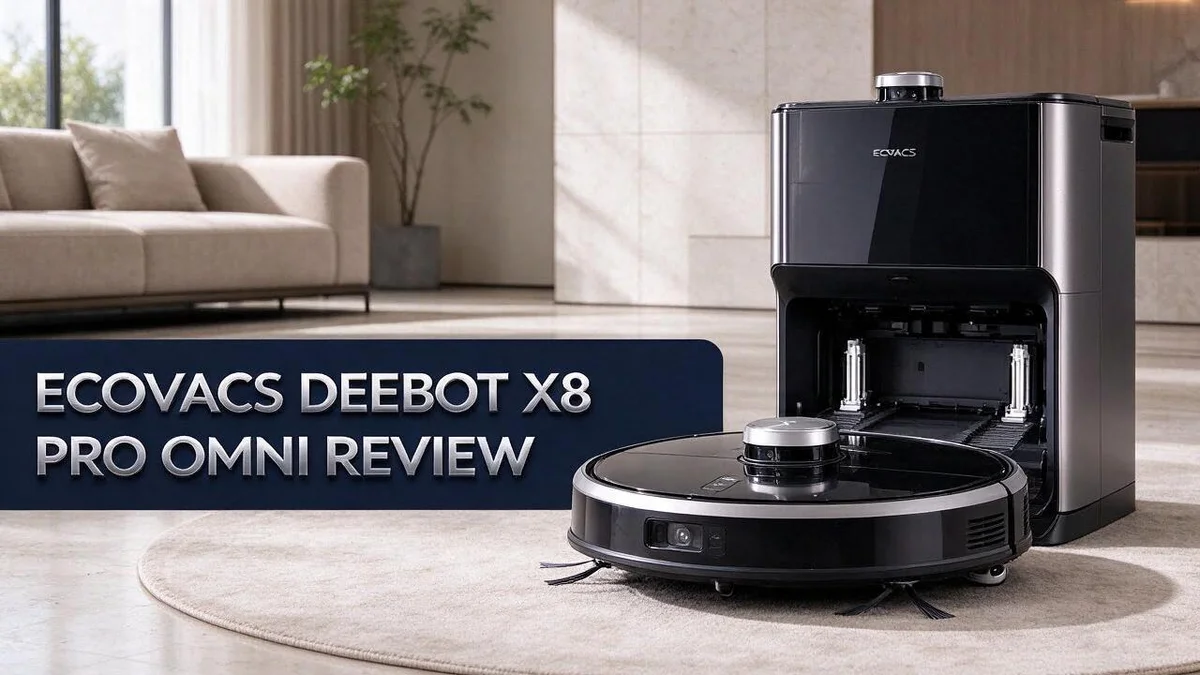
Its base station does much of the heavy lifting. It empties the dustbin, washes and dries mop pads, and refills water tanks.
It handles both solid and liquid waste, so the roller mop stays clean.
Reviewers praise its strong results on hard floors and carpets. The oscillating mop pads control water with care.
One user even says it gets stuck less than older S7 and S8 models.
Is it the right pick for your home? This guide covers its best features, its drawbacks, and how it compares with rivals like the Roborock Q7 Max.
In a Nutshell
-
Smart home ready: This model supports Matter, so it can link with many smart home systems. Many owners enjoy adding it to a connected home setup.
-
Twelve base station functions: The base station does much more than store the robot. It washes and dries mop pads, refills water tanks, and keeps the routine running with little input from you.
-
Precise water control: Oscillating mop pads release the right amount of water. Floors get a clean finish without becoming soggy, which suits homes with wood or tile.
-
Upgrade over the X8 Omni: The Pro version adds automatic cleaning solution dosing, so you spend less time on refills. It also includes a video manager and sits slightly larger on the dock.
-
Charging pad care: One owner reports dirty charging pads, so check them often. A quick wipe every so often keeps the robot ready to go.
-
Who it suits: Busy homeowners with mixed floors will value this model most. Compare it with rivals like the Roborock Q7 Max, Dreame L10s Ultra Gen 2, or Roborock QRevo Plus before you decide.
Cleaning Performance on Hard Floors and Carpets


Last update on 2026-11-24 / Affiliate links / Images from Amazon Product Advertising API
The Ecovacs Deebot X8 Pro Omni must handle both hard floors and carpets in a real home. Its performance on each surface decides how useful it feels day to day.
Hard floors are where this robot shines. Tile, laminate, and sealed wood respond well to a mix of dry pickup and damp mopping. Crumbs and dust get cleared first, and the mop follows behind.
Kitchens and hallways show the benefit most. These rooms collect sticky spots and footprints that need more than a quick sweep. A single run can leave the floor looking fresh without extra effort.
Carpets ask for a different approach. Thick fibers trap dust, pet hair, and grit deep down. Many owners run a dry pass on full room carpet, so moisture stays out of the fibers.
Rugs deserve a quick check before each run. Pull up loose edges and move tassels or cords out of the way. This simple habit keeps the robot moving smoothly and protects your rugs.
Mixed floors need a smart schedule. Run the mop on hard floors in busy rooms, then use vacuum-only sessions for bedrooms with carpet. Splitting the jobs this way keeps every surface clean.
How often you run it depends on your household. Homes with pets or young kids often need more frequent sessions. Homes with light foot traffic can stick to a weekly plan.
Simple upkeep keeps results steady. Rinse the roller mop after each use and empty the dustbin often. Clean parts lead to cleaner floors, so this habit pays off quickly.
Overall, the X8 Pro Omni handles hard floors and carpets with confidence. Good prep and the right settings make the biggest difference. Busy households get a practical helper that covers most rooms in one go.
Mopping System and Water Control
Clean water makes the real difference. A mop only works well when the water stays clean. This robot keeps fresh water apart from the dirty water it collects. Dirt does not get pushed back onto your floor.
The base station handles the messy work for you. It washes the roller mop and keeps grime from building up. You do not need to scrub the pad by hand after every session.
Drying matters more than most owners expect. A damp mop pad can start to smell after a few days. The base station dries the pads so they stay fresh between runs.
Vacuum first, mop second. Dry pickup removes loose crumbs and pet hair before the mop starts. Wet crumbs can smear if the mop runs first, so this order works better.
Water flow should match your floor. Hard floors like tile and sealed wood handle a damp pad well. Too much moisture can leave streaks or seep into wood seams.
Rugs need a different plan. Wet pads can soak carpet fibers, so check that the mop lifts or pauses on rugs. Save mopping for bare floors only.
Refill with a simple routine. Fill the clean tank before each run. Empty the dirty tank after every session so waste does not sit.
Check the water level before a big cleaning job. A low tank can leave dry spots on large floors. Running out halfway also wastes your time. Start with a short test run on one room first.
Inspect the pads weekly. Look for worn spots or stains on the mop pads. Replace them when they lose their shape or no longer absorb water well.
Small habits keep the mop system working well. Store the tanks dry when the robot is idle. This helps prevent odors and buildup over time.
Base Station Maintenance and Hygiene
Good upkeep keeps the base station fresh and working well. The dock handles most of the messy work. Still, it needs some regular care from you.
Empty and rinse the waste tank every week. Old dirty water can leave a faint smell behind. Tip it out, rinse it with plain water, and let it air dry.
Clean the filter every few weeks. Dust builds up fast in the filter. A clogged filter lowers suction and can send fine dust back into the air. Tap it clean and swap it out when it looks worn.
Watch for warning signs. A sour smell or slow emptying often points to a problem. Check the dustbin seal for cracks or loose parts. Wipe the seal with a damp cloth and let it dry fully.
Cut away tangled hair. Long hair can wrap around the roller mount and the brush area. Use scissors or a small tool to free it. Check the pad holders for grit too.
Wipe the charging contacts once a month. Dust on the metal contacts can block a good connection. Use a dry cloth to keep them clear. Then the robot can dock and charge without any fuss.
Place the base in a cool, open spot. Good airflow helps the whole station stay fresh. Avoid tight corners and damp closets, because they trap odors.
Sweep the floor around the dock. Loose crumbs and pet hair collect near the station. A quick sweep keeps the area clean. This also stops debris from getting pulled into the dock.
Run a monthly deep clean. Check the cleaning solution level before each cycle. Use only the solution the brand recommends. Your station stays cleaner and works better for longer.
Plan a simple schedule. Weekly tasks take only a few minutes. Monthly tasks fit well into one weekend. Write the plan on the fridge or in a shared calendar so everyone helps. Keep spare filters on hand so you never miss a swap.
Top 3 Alternatives
Roborock S8 MaxV Ultra

- 𝗥𝗲𝗳𝗶𝗹𝗹 & 𝗗𝗿𝗮𝗶𝗻𝗮𝗴𝗲 𝗦𝘆𝘀𝘁𝗲𝗺: Refills clean...
- ...
Last update on 2026-11-24 / Affiliate links / Images from Amazon Product Advertising API
The Roborock S8 MaxV Ultra gives strong suction and a powerful mop. It lifts its mop pad when it detects carpet.
Its dock cleans the mop pads with hot water and dries them. The large dustbin holds dirt for several cleaning runs, so you empty it less often.
Eufy X10 Pro Omni

Last update on 2026-11-24 / Affiliate links / Images from Amazon Product Advertising API
The Eufy X10 Pro Omni is a great choice for busy households. It combines a vacuum and mop in one unit.
It empties dirt into the base station, so you rarely touch the bin. Anyone who wants cleaning with little effort will appreciate this model.
iRobot Roomba Combo j9+

- FOR DIRT AND DUST PICKUP. This cutting-edge robot vacuum and mop effortlessly banishes dirt from...
- POWERFUL VACUUMING MEETS DEEP CLEAN MOPPING. Hard-working and intelligent, this 2-in-1 customizes...
Last update on 2026-11-24 / Affiliate links / Images from Amazon Product Advertising API
The iRobot Roomba Combo j9+ focuses on ease of use. It vacuums and mops with a single robot.
Its camera recognizes objects, so it avoids pet waste and small items. The app lets you schedule cleaning and check progress from anywhere.
Navigation and Obstacle Handling
Navigation shapes everything this robot does. A smart route helps it cover each room without wasting time. Good movement also means fewer missed spots.
Obstacles are the next test. Chairs, table legs, shoes, and cables all compete for floor space. The robot must spot them and steer around them.
One user reports that this model gets stuck less than the S7 and S8. That matters in homes filled with furniture. Getting stuck often means a stopped run and a frustrated owner.
Fewer stops mean the robot finishes the job on its own. You can leave it running while you work, cook, or relax. Less babysitting is a real win for busy households.
Plan your layout before the first run. Clear loose cables from the floor. Lift small rugs and light throw pillows that sit near walls.
Doorways and narrow gaps need extra care. Move chair legs apart so the robot can pass through. Check under beds and sofas for socks or toys.
Keep the path open for the best results. A few minutes of tidying saves a lot of trouble later. Most stuck events come from small items left on the floor.
Pet owners should pay extra attention here. Pets leave toys, bowls, and loose items in unexpected places. A quick scan before each run keeps the path clear.
Dark corners and low furniture can challenge any robot. Keep items off the floor under sofas where possible. This helps the robot reach hidden dust.
Watch the first few runs closely. Note where the robot pauses or turns back. Those spots show where furniture or clutter needs adjusting.
Review each run and look for skipped areas. Adjust the layout and run again. Small changes often lead to much cleaner coverage over time.
Tidying up before each session becomes a habit. Over time, the home stays cleaner and the robot runs smoother.
Smart Home Integration and Matter Support
Matter support sets this model apart. Matter is a shared standard for smart home devices. It helps gadgets from different brands work together with less fuss.
The review title highlights Matter support, and HomeKit News also covers it. This means the robot can fit into a smart home setup built around a major ecosystem. Owners who already use connected devices will feel right at home.
Why does this matter? Many homes already run lights, thermostats, and speakers from several companies. A robot that speaks the same language can join that mix without extra work.
Voice control is a common goal for many owners. People often want to start a clean with a simple spoken request. It also feels nice to check on the robot without picking up a phone.
Setup takes a little patience. Connect the robot to your home network first. Then link it to your chosen smart home platform. Make sure your phone and hub run recent software.
Routines make daily life easier. You can pair cleaning with a schedule or a trigger. For example, a morning clean can start when you leave for work. Build simple routines in your smart home app and test them for a few days.
Compatibility checks save time. Before you set up anything, confirm that your hub supports Matter. Older hubs may need an update. A quick check now prevents trouble later.
Privacy deserves attention too. Smart devices share data, so review the permissions you grant. Turn on only the features you need. Install firmware updates when they arrive, since they often fix bugs and improve security.
Some features depend on your ecosystem. Not every platform offers the same controls, so read the official support list for your system. This small step helps you know what to expect.
Overall, this robot suits people who want a connected home. Matter support adds flexibility and helps the vacuum fit into daily life. With a little planning, it can run quietly in the background while you focus on other things.
Pros and Cons
Pros
- Strong cleaning on both hard floors and carpets.
- The oscillating mop pads offer precise water control.
- The base station handles 12 functions, including auto-emptying.
- It empties both solid and liquid waste from the base.
- The Pro Omni version adds auto cleaning-solution adding.
Cons
- The charging pads can get dirty over time.
- The Pro Omni model is slightly larger than the standard X8 Omni.
- Some full specs are hard to find in one place.
Who Should Buy It
Busy households often gain the most from this machine. A routine that runs on its own can free up hours each week.
Homes with a mix of hard floors and rugs fit well here. The model handles both surfaces, so one machine can cover the whole floor plan.
Families with young children may appreciate the mopping help. Spilled juice and sticky footprints can get cleaned between deep cleans.
People who dislike emptying dustbins will like the base station. It handles the messy part, so you rarely touch the waste.
Owners who want less upkeep may enjoy the base station’s care for the mop pads. Mop pads get washed and dried without much effort from you.
Some homes need a little planning for the base station. Pick a spot near an outlet and a water source, with clear space around it.
People who love a quiet, low effort home will feel at ease. This machine suits people who want steady results without daily checks.
Anyone who likes to supervise every step may need time to adjust. Trusting a schedule can take a few weeks for many owners.
Renters in small apartments should measure their space first. The dock still needs room to sit comfortably and stay accessible.
Remote workers can start a run during the workday. Keep noise in mind if you take calls from home.
Owners with limited mobility may appreciate fewer trips for cleaning gear. The robot does the work across the floor while you rest.
Final thought: this model fits people who value convenience over hands on cleaning. It rewards owners who want a steady, low effort routine.
If you want a cleaner home with less daily effort, this robot earns a close look. Compare your floor types, room sizes, and daily habits before you decide.
Final Verdict
The Ecovacs Deebot X8 Pro Omni earns a spot on any serious shortlist. It cleans both hard floors and carpets with real strength. It also keeps its own mop pads fresh, which saves you time each week.
Think about daily life, not just the features. A machine earns its place when it runs without fuss. Keep an eye on the early cycles, then check the floors by hand. Notice any edges that still look dusty, and adjust your schedule if needed.
Who should buy it? Households that mix hard floors and rugs will get the most from one machine. Busy homes with pets or young children may also appreciate the regular cleaning. Anyone who wants a simple routine will feel the benefit quickly.
Who should look elsewhere? If you enjoy controlling every mop pass, this model may feel too automatic. If your home has tight corners or an unusual layout, measure your rooms before you decide. A different model may fit that layout better.
Our overall verdict is positive. The X8 Pro Omni delivers strong cleaning, helpful base station care, and solid smart home reach. The known drawbacks, such as dirty charging pads, are easy to manage with a quick wipe every so often.
Compare it with close rivals before you choose. The Roborock Q7 Max, the Dreame L10s Ultra Gen 2, and the Roborock QRevo Plus each bring a different mix of strengths. Pick the machine that matches your floors, your routine, and your patience.
Bottom line: The Deebot X8 Pro Omni is a capable helper for people who want clean floors with less effort. It suits busy homes that value consistent results and a simple daily routine.
Frequently Asked Questions
Does the Ecovacs Deebot X8 Pro Omni handle pet hair?
Yes, pet owners often find it useful. The strong suction and roller mop help lift everyday fur from hard floors. Clear loose cords and small items first. This keeps the brush area clear and helps it work well.
Does it work with smart home systems?
It includes Matter support, so it can connect with many smart home platforms. Check your home app before you buy. This helps you confirm which system fits your setup.
How often should I clean the charging pads?
Some users report that the charging pads get dirty over time. Wipe them with a dry cloth every week. Clean contacts help the machine charge reliably.
Can it clean thick rugs well?
Owners report strong carpet cleaning, but very thick rugs may need a quick test first. Start with a small area to see how it performs. This shows you whether the rug suits the machine.
Will it get stuck under furniture?
One owner said it gets stuck less often than older Ecovacs models. Still, a floor free of cables and loose items helps it move smoothly. A quick tidy before each run saves time.

Hi, I’m Ivy! I’m a smart home enthusiast and self-proclaimed clean freak who loves testing the latest cleaning tech so you don’t have to waste your money on the wrong one. I started HomeTechClean to share honest reviews and practical advice for anyone who wants a cleaner home with less effort.